

【Amazon Lightsail】【第3回】WordPressの管理ダッシュボードのアクセス方法
WordPressの管理ダッシュボードのアクセス方法を紹介します。
まずSSHクライアントソフトを使用してインスタンスにリモートSSH接続し、WordPressの管理ダッシュボードのパスワードを取得します。
リモートSSHの接続手順については、以下の記事をご一読ください。
Visual Studio CodeのRemote SSH設定手順
管理ダッシュボードのパスワードを取得する
SSHクライアントウィンドウが開いたら、次のコマンドでパスワードを取得します。
cat $HOME/bitnami_application_password管理ダッシュボードにサインインする
WordPressの管理ダッシュボードのサインインページを開きます。
PublicIpAddressはインスタンスのパブリックIPアドレスに置き換えてください。http://PublicIpAddress/wp-login.php
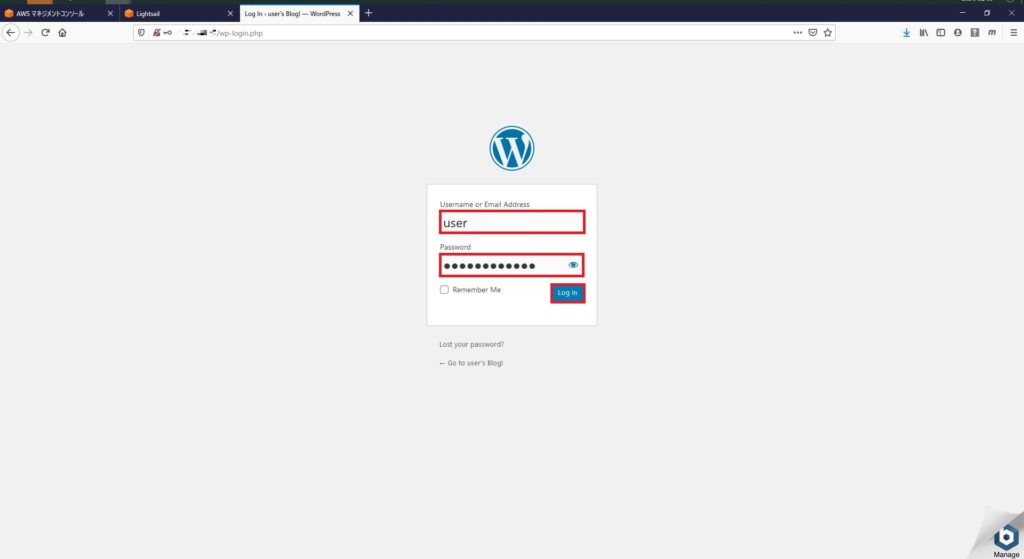
下記のボックスにサインイン情報を入力後、[Log in]を選択します。
Usernameはuser(初期ユーザ)、Passwordは先ほど取得したパスワードを入力します。
・[Username or Email Address]
・[Password]
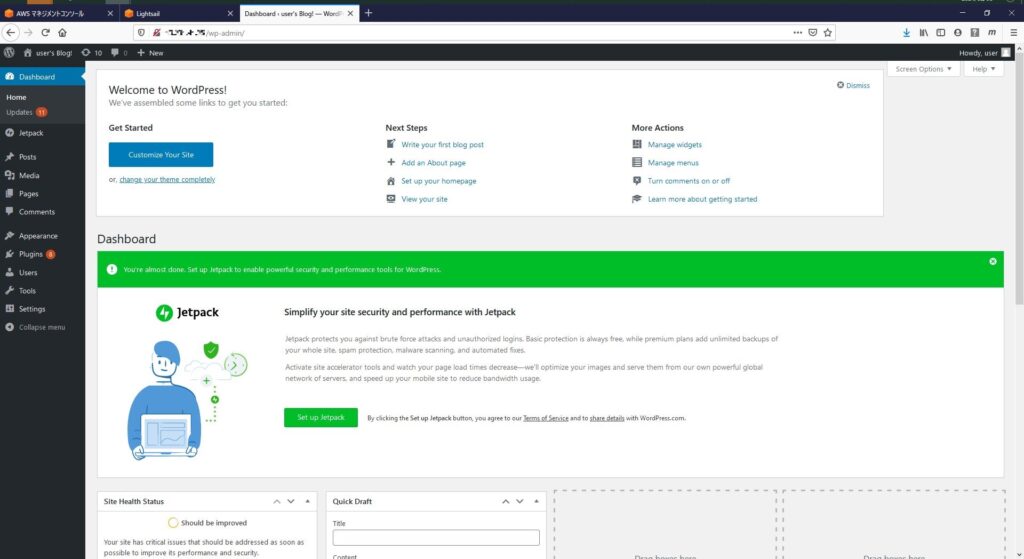
WordPressの管理ダッシュボードにサインインできたことを確認します。
お疲れ様です!
以上で、WordPressの管理ダッシュボードにアクセスできました!
ここから簡単に記事の追加・更新ができます!
今後は、WordPressやAmazon Lightsailのセキュリティ対策について紹介していく予定です!